
For server owners
Ready-to-fill server description templates
Three editable templates for classic, oldschool and custom-system servers. Add verified details, format the description and check both language versions.
Last updated: November 12, 2026
If you are unsure how to begin a server description, choose one of the three templates below. Each helps players find the launch information and core settings first, followed by progression details and community links.
Square brackets mark fields for you to fill in. Replace them with verified information. Do not present unavailable systems or undecided rewards as confirmed features. Remove unnecessary lines and clearly mark unknown details as Not yet announced. A template does not establish what your server actually offers.
1. Put the template in the correct language tab
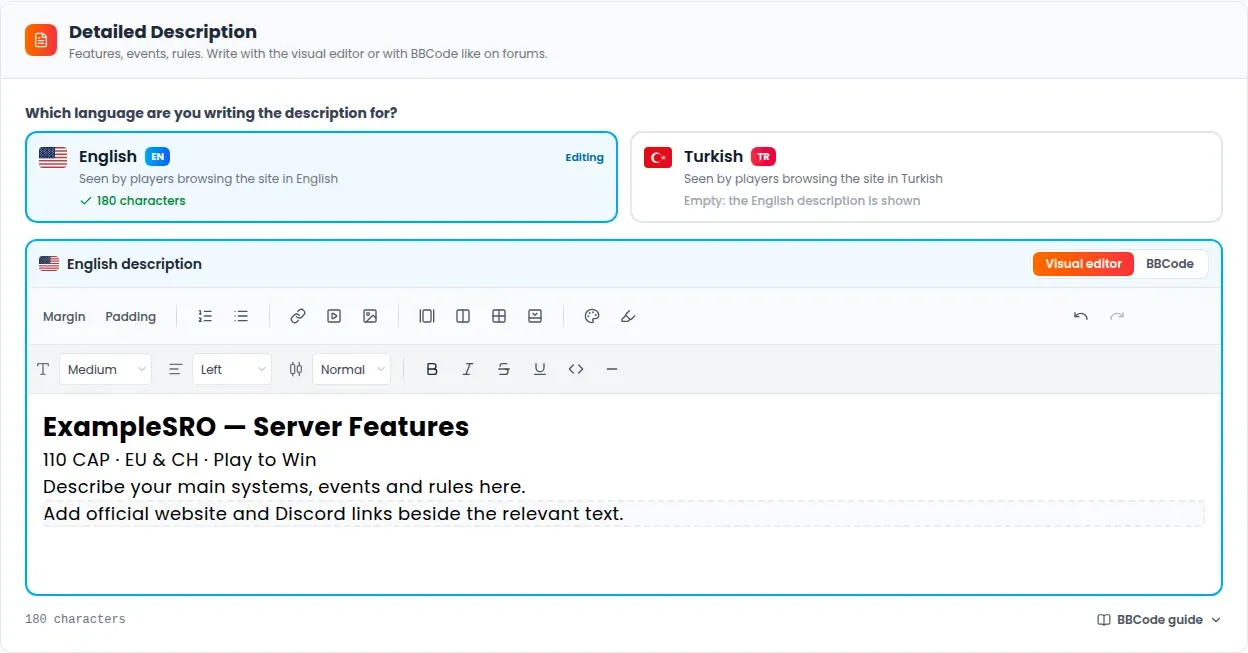
Open My Servers, find the listing and use its pencil icon with the Edit tooltip. In Detailed Description, choose the language you are writing. Use this page’s templates in English; the Turkish version of the guide has separate Turkish templates.
Copy the chosen template as plain text and paste it into the visual editor. You do not need to make the entire description look like the code box below. If you want to keep the existing description, take a copy before replacing it and check where the new text is being inserted.
2. Template for a classic server
This layout suits servers explaining standard progression and core game systems. Give the actual rates instead of only saying medium rate, which can mean different things to different players. Explain what a player does on day one and where equipment comes from.
[SERVER NAME] — [CAP] CAP | [RACES] | [PLAY STYLE]

Introduction
[Describe the target player and core progression in 2–3 sentences.]

Launch
Official launch: [DATE] [TIME] [TIMEZONE]
Beta: [DATE/TIME/TIMEZONE or NO BETA]

Core settings
CAP / races: [CAP] / [RACES]
EXP / SP / drops: [ACTUAL RATES]
Maximum plus: [VALUE]
IP / PC / guild / union limits: [VALUES]

Progression and economy
Getting started: [THE PLAYER’S FIRST STEPS]
Obtaining equipment: [SOURCES AND CONDITIONS]
Job / trading: [SYSTEM AND RULES]
Payments / donations: [PRODUCTS AND THEIR EFFECTS]

Community and links
Events: [CONFIRMED SCHEDULE or NOT YET ANNOUNCED]
Website: [OFFICIAL URL]
Download: [OFFICIAL DOWNLOAD PAGE]
Discord / support: [LINK AND CONTACT METHOD]
3. Template for an oldschool server
Explain what oldschool means on your server. Separate the era you follow, the mechanics you preserve and any convenience features you add. If systems have been modified, describe those differences rather than claiming that everything is original. This sets clear expectations before players join.
[SERVER NAME] — [CAP] CAP Oldschool

Which era does this server follow?
[REFERENCE VERSION/ERA and the features preserved]
[Clearly state the differences from the original experience.]

Launch and access
Official launch: [DATE] [TIME] [TIMEZONE]
Beta: [DETAILS or NONE]
Races / CAP: [RACES] / [CAP]
EXP / SP / drops: [ACTUAL RATES]
Maximum plus and limits: [ACTUAL VALUES]

Classic experience
Preserved systems: [CLASSIC SYSTEMS THAT ARE AVAILABLE]
Changed systems: [CHANGES or NONE]
Convenience features: [AVAILABLE TOOLS or NONE]
Equipment and job progression: [ACTUAL RULES]
Payments / donations: [PRODUCTS AND GAMEPLAY EFFECTS]

Player notes
Expected pace: [DESCRIPTION]
Event / maintenance announcements: [WHERE TO FOLLOW THEM]
Website: [OFFICIAL URL]
Download: [OFFICIAL DOWNLOAD PAGE]
Discord / support: [LINK]
4. Template for a custom-system server
Give each custom system more than a name: explain access requirements, the player’s actions and its limits. Separate available features from beta or planned features. A real screenshot next to a system’s explanation can show its operation more clearly than a long slogan.
[SERVER NAME] — [CAP] CAP | [DISTINCTIVE SYSTEM]

Server focus
[Describe the target player and how custom systems fit progression.]

Launch and core settings
Official launch: [DATE] [TIME] [TIMEZONE]
Beta: [DETAILS or NONE]
CAP / races / rates: [ACTUAL VALUES]
Plus / IP / PC / guild / union: [ACTUAL LIMITS]

Custom system 1: [NAME]
How to access it: [ENTRY REQUIREMENTS]
How it works: [WHAT THE PLAYER DOES]
Rewards / cost / limits: [VERIFIED RULES]

Custom system 2: [NAME or REMOVE THIS SECTION]
How to access it: [REQUIREMENTS]
Process and limits: [RULES]

Economy and events
Equipment sources: [SOURCES]
Payments / donations: [PRODUCTS AND EFFECTS]
Events: [TIME/TIMEZONE and PARTICIPATION REQUIREMENTS]
Development state: [SEPARATE AVAILABLE, BETA AND PLANNED FEATURES]

Website: [OFFICIAL URL]
Download: [OFFICIAL DOWNLOAD PAGE]
Discord / support: [LINK]
5. Turn the text into a readable description
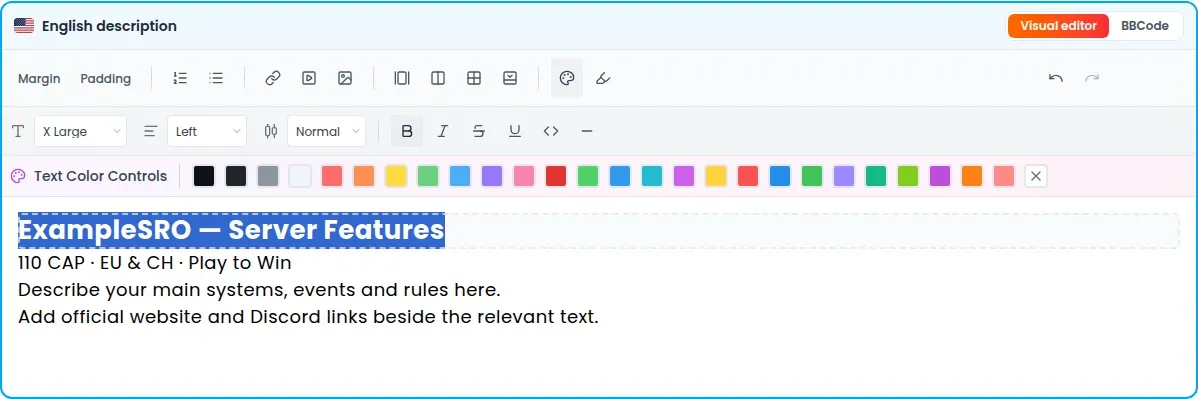
After filling in the template, select section labels and apply the editor’s formatting options. Keep launch details, systems and links visually distinct. Emphasize a few important facts instead of making the whole description large, bold or colorful. Split long paragraphs.
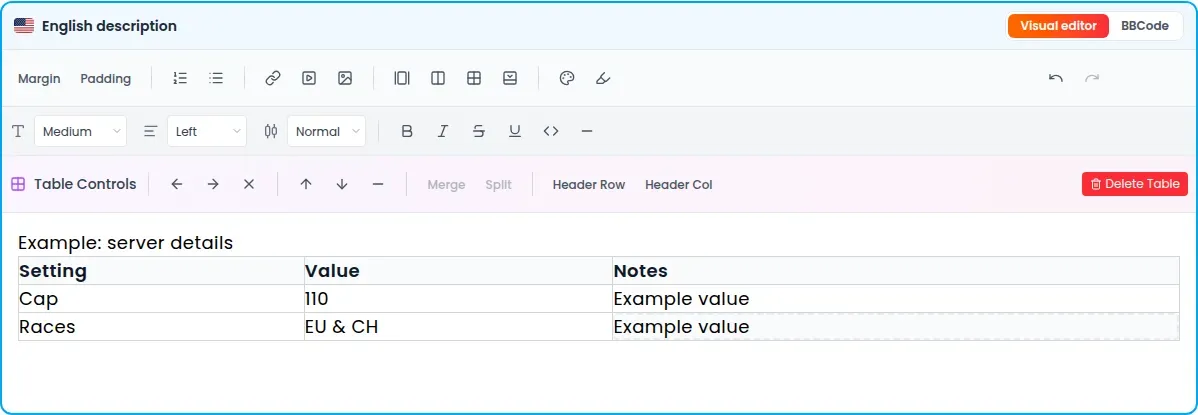
You can move comparable details such as cap, rates and limits into a small table. Check wide or complicated tables on a phone. Place images beside the system they describe so readers do not have to search several screens later to understand a picture.
Use the detailed description editor guide for the tools themselves. These templates are plain-text starting points; keep visual-editor formatting and BBCode syntax distinct.
6. Check placeholders and both languages before saving
Search the text for [ and ] to find unfilled fields. Compare dates, times and timezones with the launch information in the form. Open the website, download and Discord links individually. Make sure a newly edited link label is not still pointing to an old address.
Check that English and Turkish give the same rates, limits and dates. Use separate language tabs instead of pasting both languages one after another into one tab. Review dates and logos written inside screenshots as well.
Inspect the preview at desktop and phone widths. When ready, use Update Server for the existing listing. Description changes on an active server may wait for review, so check what visitors see too; the preview and published content may not change at the same time.