
For server owners
How to measure your promotion campaigns
Create separate short links for promotion channels, add UTM tags for external destinations and compare link analytics without confusing visits with player registrations.
Last updated: November 12, 2026
To assess a promotion, first distinguish which link was shared in each place. SRO.GG short links help you organise that comparison. ExampleSRO, example addresses and campaign names in the screenshots are for demonstration; use the real destination address for your own server.
1. Plan a separate short link for each channel
If you share an announcement on Discord, a forum and social media, create a separate short link for each channel. They can all point to the same destination. Different short addresses let you compare the traffic collected by each share. One address used everywhere combines the results, and missing referrer information can make the channels difficult to separate.
Keep a simple record of the campaign name, channel, short address, target address and publication time. For example, “November launch / Discord” and “November launch / forum” can represent two shares within one campaign. This also helps prevent accidentally reusing an old address for a later campaign.
2. Choose the appropriate link type
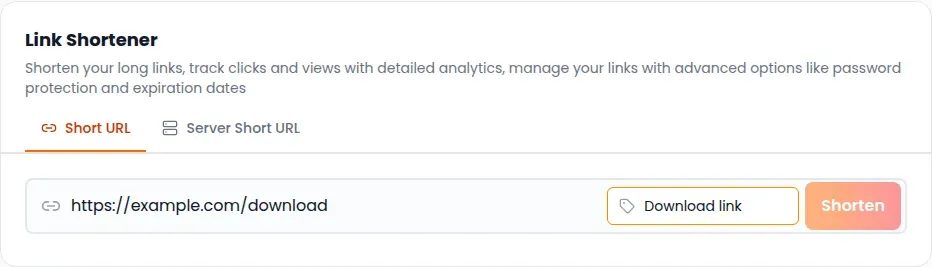
Open Create Short Link. Use Short URL for your own website or Server Short URL for the server’s SRO.GG listing. Add a description or tag that helps you recognise the channel. Tags organise your links; by themselves they do not measure visitor sources or registrations.
Keep the destination and visitor journey comparable between channels. A password or transition advertisement on one link but not another can affect results. If you deliberately test such differences, record them rather than assuming the channel was the only change.
3. Add UTM values for external destinations
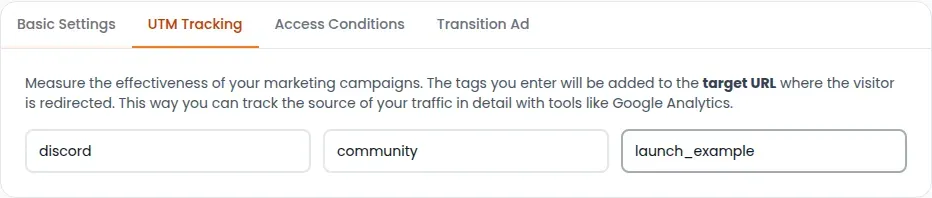
The Source, Medium and Campaign fields in UTM Tracking are added to the external destination address. For example, use discord as the source, community as the medium and launch_example as the campaign. Changing the source for the forum link while keeping the campaign name consistent makes comparison easier in your own analytics tool.
Each field accepts up to 100 characters. Use concise, consistent names, and check that your destination website has measurement that interprets those parameters. If the target already contains the same UTM parameter, the value entered in the short-link form replaces it. Test the link and inspect the parameters on the final address.
4. Account for the restriction on SRO.GG destinations
UTM fields are disabled for Server Short URL and links pointing to the SRO.GG domain. This is not a missing package feature or a form error: adding these tags is available for external destinations. Visits within SRO.GG use its existing internal analytics.
Continue using separate short links for Discord and forum campaigns that lead to your server listing. Each link has its own analytics page. Disabled UTM fields do not mean you need to combine every channel into one address. Equally, do not expect internal analytics to identify the exact campaign name for every individual visit.
5. Open link analytics and understand its scope
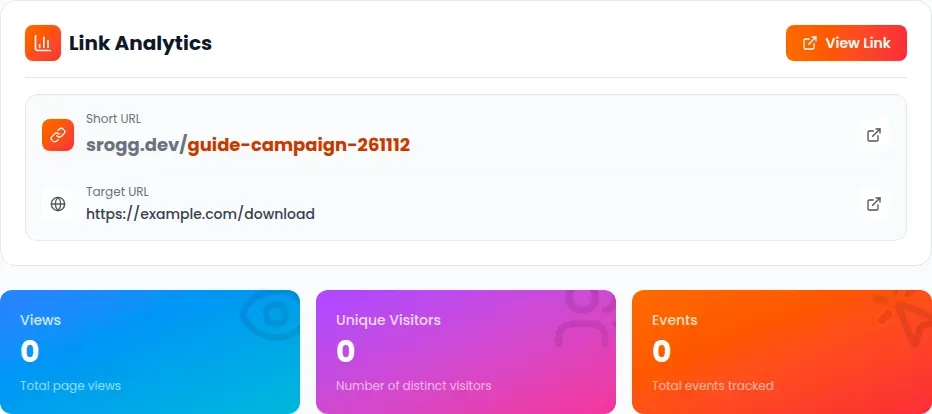
Go to My Short Links and choose Statistics for the relevant link. Check the short and target addresses beneath Link Analytics. Views can include repeats and bots, while Unique Visitors uses tracking identities from visits not classified as bots. Review Traffic Sources alongside Bot Traffic.
An Events count or an advertisement interaction does not establish that a game account was created. A short-link view does not establish that registration on the destination page was completed either. Destination sessions and registrations are separate stages that require verification through your own measurement system.
6. Compare results and choose the next test
The current short-link analytics screen has no date-range selector. Creating a new link for a new campaign reduces overlap with earlier traffic. If you reuse an existing link, record its starting view count and the time. The difference between cumulative unique visitor counts is not a count of all unique visitors during that campaign.
Compare channels over similar publication periods, taking account of timing, destination, access requirements and bot traffic. More views alone does not mean more players. For your next test, changing one factor, such as the announcement title, channel or image, makes the results easier to interpret.