
For server owners
How to use automatic boosts
Set an Auto Boost interval, check the cost per operation and turn it off when needed. Learn how to reactivate it after an insufficient balance.
Last updated: November 19, 2026
Auto Boost schedules paid boosts for your active server. You do not need to stay on the site, but every completed boost spends GGCoin.
It is available with Basic, Elite and Legend. Having a listing package does not make automatic boosts free; the free boost included with Elite and Legend is only used when you click the Boost button yourself. For a one-time action and the free boost, see the manual Boost guide.
1. Open your active server’s settings

Find the correct listing on My Servers, signed in with its owner account. Hover over the timer icon in the action row to find the Auto Boost tooltip, then click it.
This control appears for active servers. Auto Boost cannot activate a pending or inactive listing. Opening the settings window does not, by itself, enable automatic boosts.
2. Check the cost and choose an interval
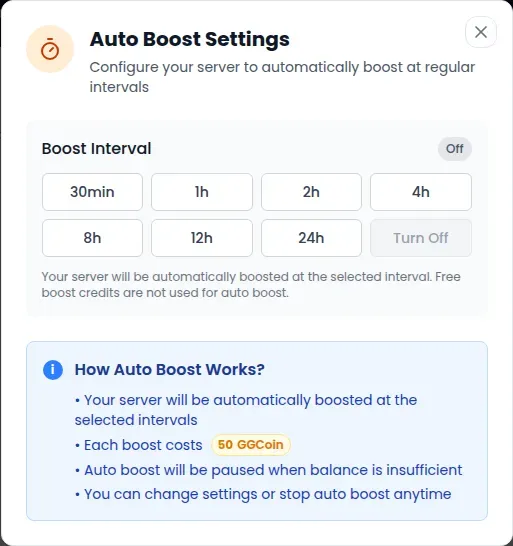
Auto Boost Settings shows the current state and the available intervals: 30min, 1h, 2h, 4h, 8h, 12h and 24h.
The information box gives the GGCoin cost per boost. When this guide was prepared, each automatic boost cost 50 GGCoin. Shorter intervals can result in more operations and greater spending. For example, if 24 boosts happen at a one-hour interval, they cost 1,200 GGCoin altogether; this is not a fixed daily charge.
Clicking an interval saves it immediately. There is no separate Save Settings step. Check the selected interval and Active label. If an error appears, do not assume the setting changed successfully.
3. Understand the timing
The system checks whether the selected interval has passed since the last boost. A manual boost also changes that time, so it can affect the next automatic operation. The interval is a scheduling setting, not a guarantee that a boost will occur at an exact minute or second.
If your server is already at the top of the boost ordering, an unnecessary automatic boost is skipped. Choosing an interval therefore does not guarantee a charge every time that interval passes. Each completed paid operation reduces your balance, and free boost allowances are not used for Auto Boost.
4. Recheck the setting after a low balance
If your balance cannot cover the next boost, Auto Boost is turned off. Adding GGCoin later does not automatically reactivate a disabled setting. Refresh My Servers, open Auto Boost and select an interval again if you want to continue.
If you enable it for several servers, remember that all of them spend from the same account balance. Check each server separately; an interval selected for one server does not apply to the others.
5. Change the interval or turn it off
Choose another interval in the same window to change the schedule. To stop it completely, click Turn Off among the interval options and check that the status says Off.
The cross in the corner only closes the window; it does not stop automatic boosts. Turning the setting off does not reverse spending from boosts already completed. Check the actual status label when your plans change.