
Rankings and systems
Starting on a new Silkroad server: what to check first
Compare new Silkroad servers by beta rules, resets, progression, equipment and activity schedules. Find the questions to answer before you start.
Last updated: November 23, 2026
Joining a new Silkroad server can let you experience progression alongside a developing community. To choose well, compare its beta rules, progression, equipment sources and activity schedule as carefully as its opening date. A recent launch alone does not establish equal starting conditions or show how long a project will remain available.
This guide helps you decide which shortlisted server deserves your playing time. Listings in the screenshots illustrate the interface; check current dates and rules on the individual server page and its official announcements.
Separate recently opened servers from upcoming launches
The new Silkroad servers list contains listings with reported opening dates within the past month. This is the launch date, not the date the listing was added to SRO.GG. To join from the opening hours, use the upcoming server calendar, which covers reported launches over the next six months.
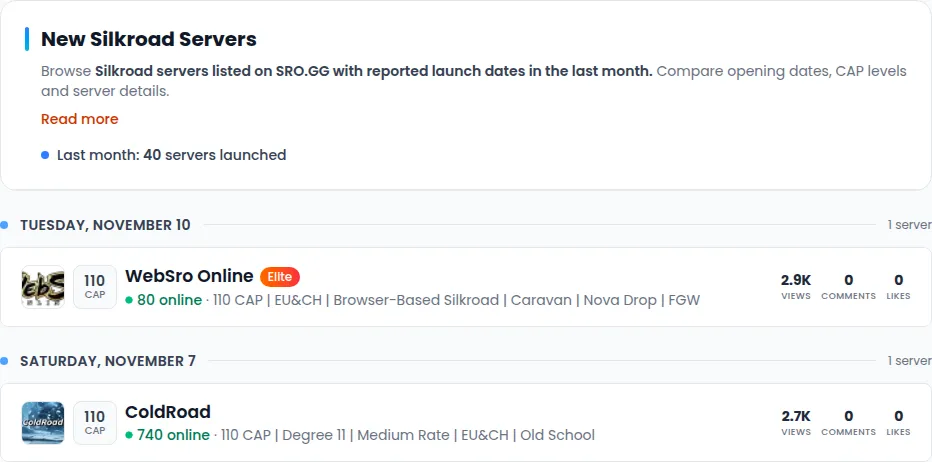
Shortlist two or three candidates. A server opening today may still have the wrong CAP, races or play style for you. Another that opened several days earlier may suit you better if friends already play there and its rules are clear. Note the date, CAP and official introduction link so you can compare the same details later.
Check beta, grand opening and reset rules
Ask whether beta characters, items and earned rewards carry over to the grand opening. Test progress may be reset on some projects; never assume every server follows the same policy. A beta announcement may describe a test period rather than the start of persistent progression.
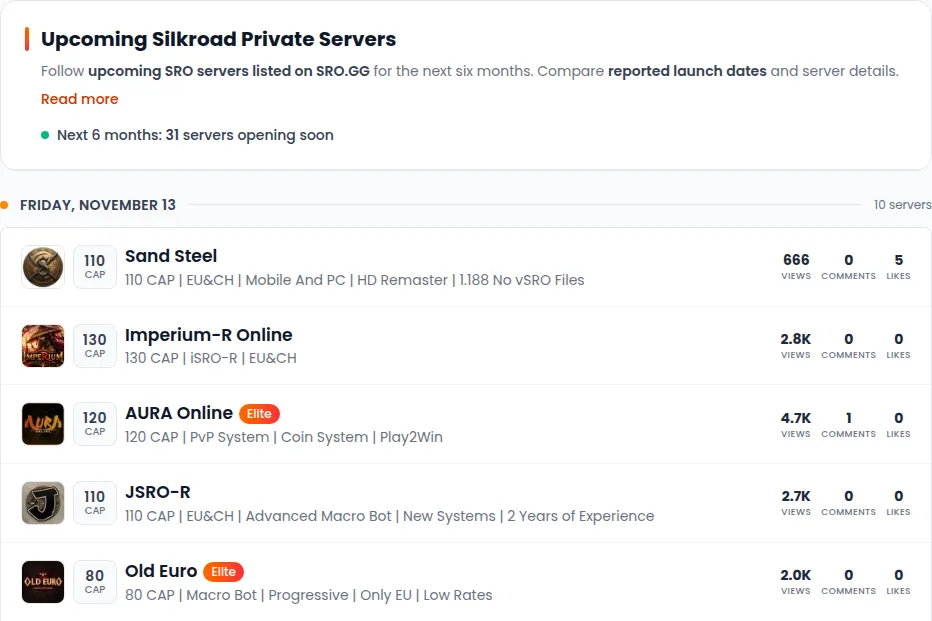
Record the beta and grand opening dates, times and timezones separately. If a date changed, identify the latest announcement. For a new season or relaunch, find out what happens to previous characters, names, balances and earlier advantages. Treat unanswered questions as unknown rather than filling the gaps with assumptions about other servers.
If you do not want to miss the launch, press Remind me on the server page to be notified 30 minutes before it starts. See Notifications and reminders for how reminders work.
Look at your first evening and first week
Read the starting level, supplied equipment, EXP and SP rates, quests and first available activities. Two servers with the same CAP can offer different starting experiences. High EXP does not necessarily mean fast access to final equipment: consider levelling and equipment progression separately.
Work from the time you can actually play. Can you progress alone, or will you need a regular party? Are there daily tasks or entry limits? Can you catch up after missing an activity? Set two manageable goals for your first session, such as trying the starting quests and finding a community, instead of expecting to understand every system immediately.
Compare equipment sources and paid options
Find out how the equipment you want is obtained: drops, quests, job activities, events, trading or another system. Entry requirements and limits matter as much as the source's name. An item shown in a promotional image does not establish that every player can obtain it through the same route.
Check | Look for a clear explanation |
|---|---|
Starting conditions | Level, equipment and any starter assistance |
Progression | EXP/SP, equipment sources and daily limits |
Paid content | Products available and their in-game effects |
Season transition | Progress that is reset or retained |
If you intend to play without spending, check alternative ways to obtain paid items and the time involved. Labels such as Play2Win or Free Silk do not explain every condition. Compare the published products and rules; ask an official support channel about any important detail that is missing.
Does the community's schedule fit yours?
Compare the days and times of job activities, fortress war, dungeons and other events with your own schedule. A crowded opening does not show that those players will be available when you log in. Check the timezone explicitly, especially when the community includes players from different countries.
If you are joining with friends, review IP, PC, guild and union limits together. Ask how the rules apply to players connecting from the same household. Finding a guild or help channel in your language can be more useful than a large general online count. Community chat activity is a separate signal from the number of people playing the game.
Reassess after a short first session
Use the official download route and plan a short trial session. Check connection quality, starting instructions, quest clarity and whether the help you need is available. If a feature behaves differently from its description, look for a current explanation before treating the difference as permanent.
A launch-day problem alone cannot predict the future. Review how the team explains it, how current its announcements are and what next step it has described. Return to your shortlist notes: does this server offer the experience you wanted? Resolve important unknowns before your whole group bases its plans on the same project.
Frequently asked questions
Is joining a few days after launch a disadvantage?
That depends on progression, the economy and support for newcomers. Check starter assistance and event entry requirements rather than deciding only from the number of days since launch.
Does playing the beta provide an advantage at launch?
It can help you learn the systems. Whether characters, equipment or rewards transfer depends on the project's published beta rules.
Does being listed confirm the opening will happen?
The list shows recorded dates. Make your final check against the server's latest official announcement. For calendar navigation, see the guide to tracking upcoming servers.