
Rankings and systems
How to find an active, populated Silkroad server
Compare populated Silkroad servers using reading times, player history, parties, guilds and events. Find a community active when you want to play.
Last updated: November 13, 2026
To find a populated Silkroad server, use the online count as a starting point, then check when it was read, how it changes and whether the activities you want are busy. An active server that suits you should offer a community and content you can join during your own playing hours.
This guide helps you evaluate the most populated Silkroad servers against your preferences. Screenshot figures belong to the moment of capture; counts and rankings change. One screenshot cannot establish a lasting population or the quality of a project.
Define the kind of activity you want
Write down what population should provide for you: levelling parties, job competition, fortress war, item trading or a guild to talk to. Those activities do not all have to be busy at once. A server with many characters may have few parties at your level, while a smaller community may meet your needs during its regular events.
Narrow your CAP and race preferences early. Choosing character options you dislike just for a large online figure can make your longer-term plan harder. Deciding which evenings you can play and what you want to do makes a population comparison more meaningful.
Read online rankings together with their timestamps
The most populated Silkroad servers list orders eligible listings by their latest reported online counts. Readings older than 24 hours are excluded. A recent reading is still not a live count for the exact second you open the page.
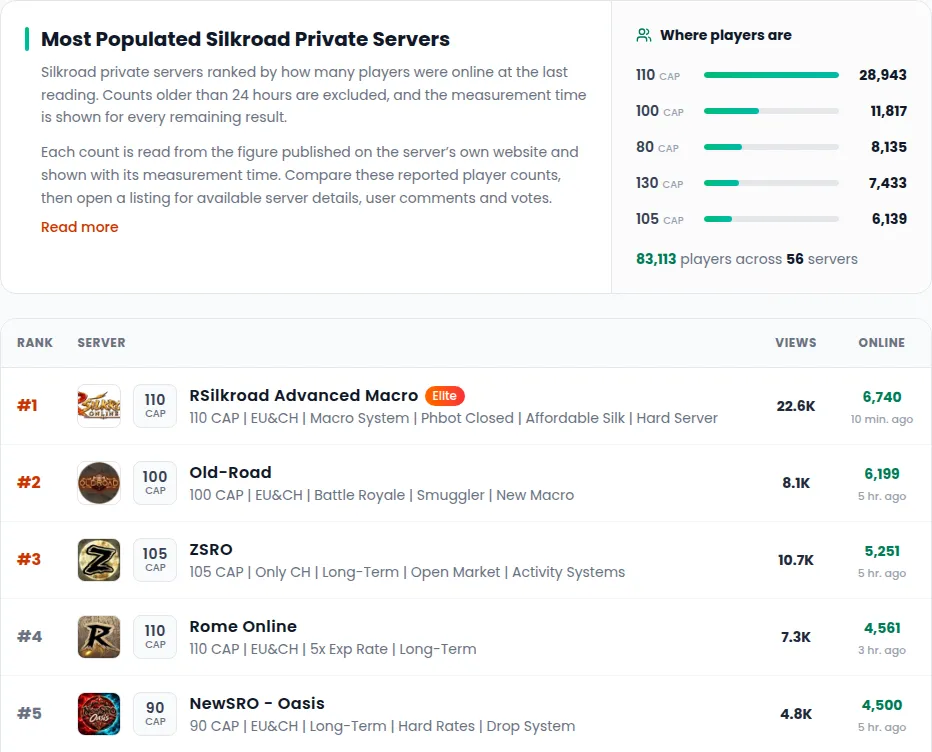
SRO.GG reads figures from the servers' own websites; it does not independently count distinct people in the game. Check the reading times for your candidates. Comparing one during an event with another in the early morning is not comparing similar conditions. Treat the source and timestamp as part of the figure.
Look at your playing hours, not one peak
Open the server page's Online History section and review its last reading and, where enough data exists, averages, peaks and chart. A 24-hour view helps with daily variation; seven days gives a wider pattern. If you play evenings, compare several evenings rather than treating one weekend as representative of the whole week.
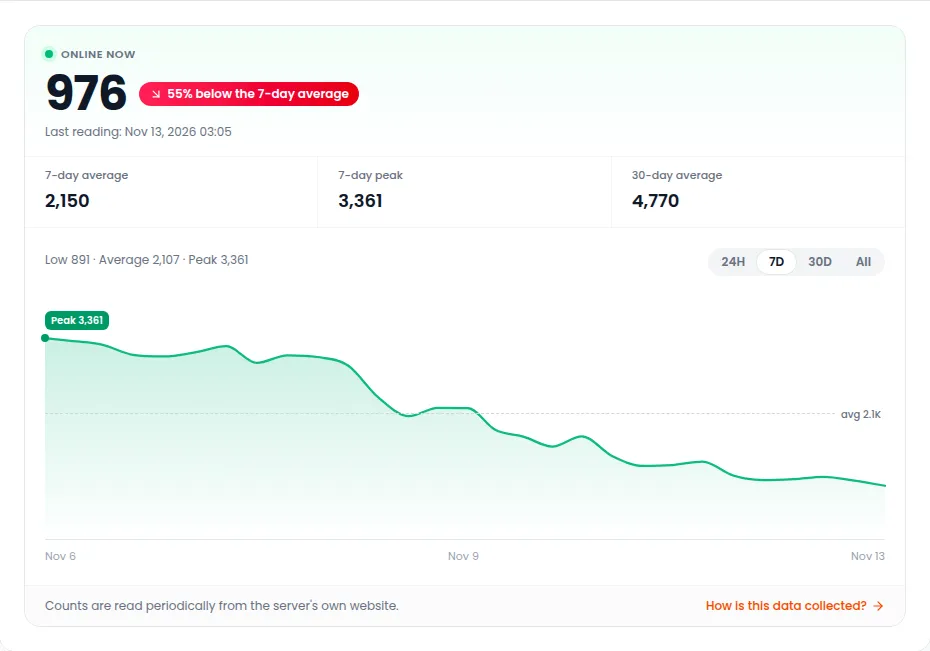
A newly opened server naturally has limited history. Gaps or a flat-looking section do not establish that the population stayed unchanged throughout that period. Keep missing data separate from a recorded zero: zero means the source reported zero during that reading; no data provides no population result.
A drop is not enough to conclude that a server is closing. Compare reading times, official maintenance announcements and later observations. For a spike, check whether its timing matches an announced event or launch. A relationship visible on the chart does not, by itself, establish the cause.
Do not equate characters with active people
If a person can run several characters, a high character count may not represent the same number of different players. Bot, macro and connection rules can also differ between candidates. A counter alone cannot show who controls each character or how that character is being played.
Read IP and PC limits, bot policies and any offline stall rules in the introduction. Ask the operator whether features such as offline stalls are included in its count instead of assuming every server uses the same counting method. Missing explanations also do not establish that a listing is fraudulent; they remain questions to resolve.
Compare several signs of activity
Evaluate two or three candidates using the same questions. The table below helps you identify missing information before turning a large figure into a positive decision.
Signal | Detail to check |
|---|---|
Online count | Source, last reading and your playing hours |
Parties and guilds | Groups matching your level, language and schedule |
Job activities and events | Current schedule and actual entry requirements |
Economy | Whether you can trade the products you need |
Community | Recent questions, replies and announcements |
A crowded town screenshot does not show that your chosen activity is busy. Check when promotional images were taken and which environment they show. If you can try the game, assess whether parties and trading opportunities are available during your own usual session.
Evaluate comments, listing interest and rewards separately
Read the event and date described in a comment, rather than only its positive or negative wording. Look at how similar questions were answered on different days. An experience from a previous season may not describe today's rules, and one comment cannot represent every player's experience.
Hype, page views and likes are different indicators of interest on SRO.GG. They should not be read as in-game population. Advertising or a reward announcement can attract short-term attention; check the continuity of the activities you want separately. The data methodology explains the measurement details.
Frequently asked questions
Does the highest online figure identify the best server?
It does not establish the gameplay, rules or suitability for you. Compare CAP, progression, community and activity schedules alongside the figure.
Is a server empty when it has no online count?
No. An accessible counter or usable reading may be missing. Review current announcements, the community and, where possible, your own playing experience.
Can beginners still join a populated server?
That depends on starter assistance, party requirements and economic conditions. Alongside general population, check the responses to questions from new players.