
Getting started
How to choose a Silkroad private server
Compare cap, race, limits, dates, reported player counts and comments using Hitsro as an example. Use the checklist to decide which server suits you.
Last updated: November 9, 2026
Start by deciding what you want: your preferred cap and race, the size of your group and when you want to start. Then compare those preferences with the information shown on SRO.GG.
We’ll use Hitsro - Dawn of Valor to show how the checklist works. This is a checklist you can reuse for other servers, rather than a recommendation to join Hitsro. If you need help finding a listing, read the guide to using SRO.GG.
1. Cap and race

Max Level is the highest character level available, also called the cap. Hitsro shows 120 CAP in this example. If you know your preferred cap, start with its list, such as the 120 cap page.
Check Race too. Only CH means Chinese characters only, Only EU means European characters only, and EU&CH includes both. Our Hitsro example shows EU&CH. Make sure your preferred character type is included.
Cap alone does not tell you how long progression will take. Check the introduction's rates and systems to understand the intended pace.
2. IP, PC, guild and union limits

The Hitsro screenshot shows an IP Limit of 8 and a PC Limit of 4. Pay attention to these if people will play from the same home or computer. Confirm how the limits are enforced in the server's own rules.
Guild Limit and Union Limit help with group planning; the example shows 16 and 2. Decide whether these limits work for your group. Check the current server page, since the screenshot only captures one moment.
3. When to start playing

The example's Launch Date is 25 September 2026 at 21:00. This is Hitsro's recorded opening time. That date had already passed when the screenshot was taken, so you could no longer join Hitsro on its first day.
If you want a fresh start, browse Upcoming Servers. Keep Beta Date separate from the main launch; past beta dates are hidden on the server page. Times use the server's configured time zone.
4. Systems and rates
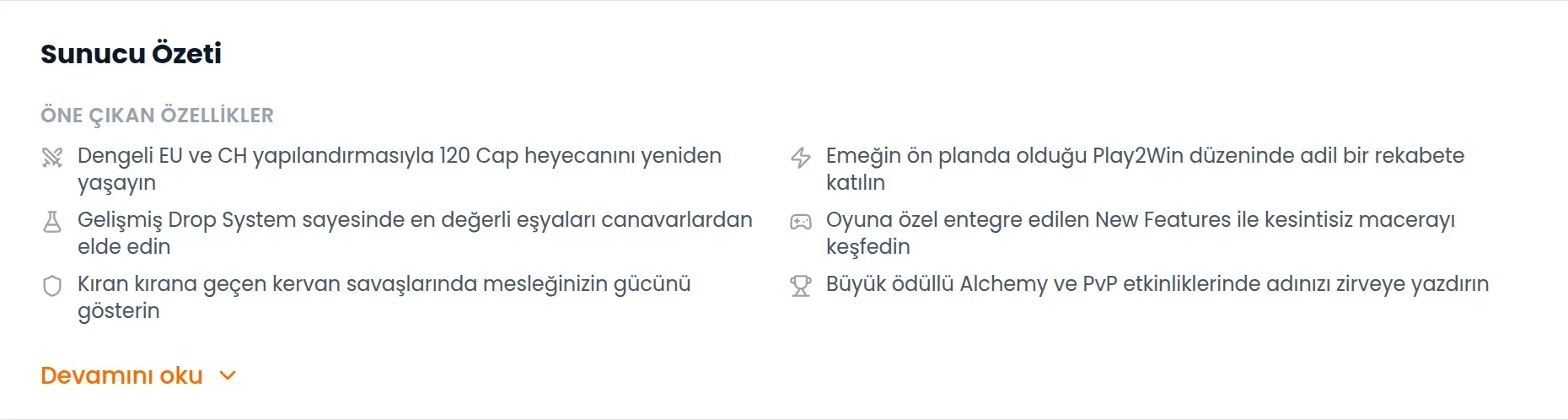
Server Overview is a useful starting point. Hitsro's example mentions Play2Win, a drop system and events. These are the features the server advertises. They do not guarantee a particular experience in the game.
Next, read the details in Introduction. Note the rates, ways to obtain items and event times that matter to you. If a detail is missing, check current announcements through Website or the server's community links. Those links are also useful if the introduction area is blank.
5. Player counts and their source
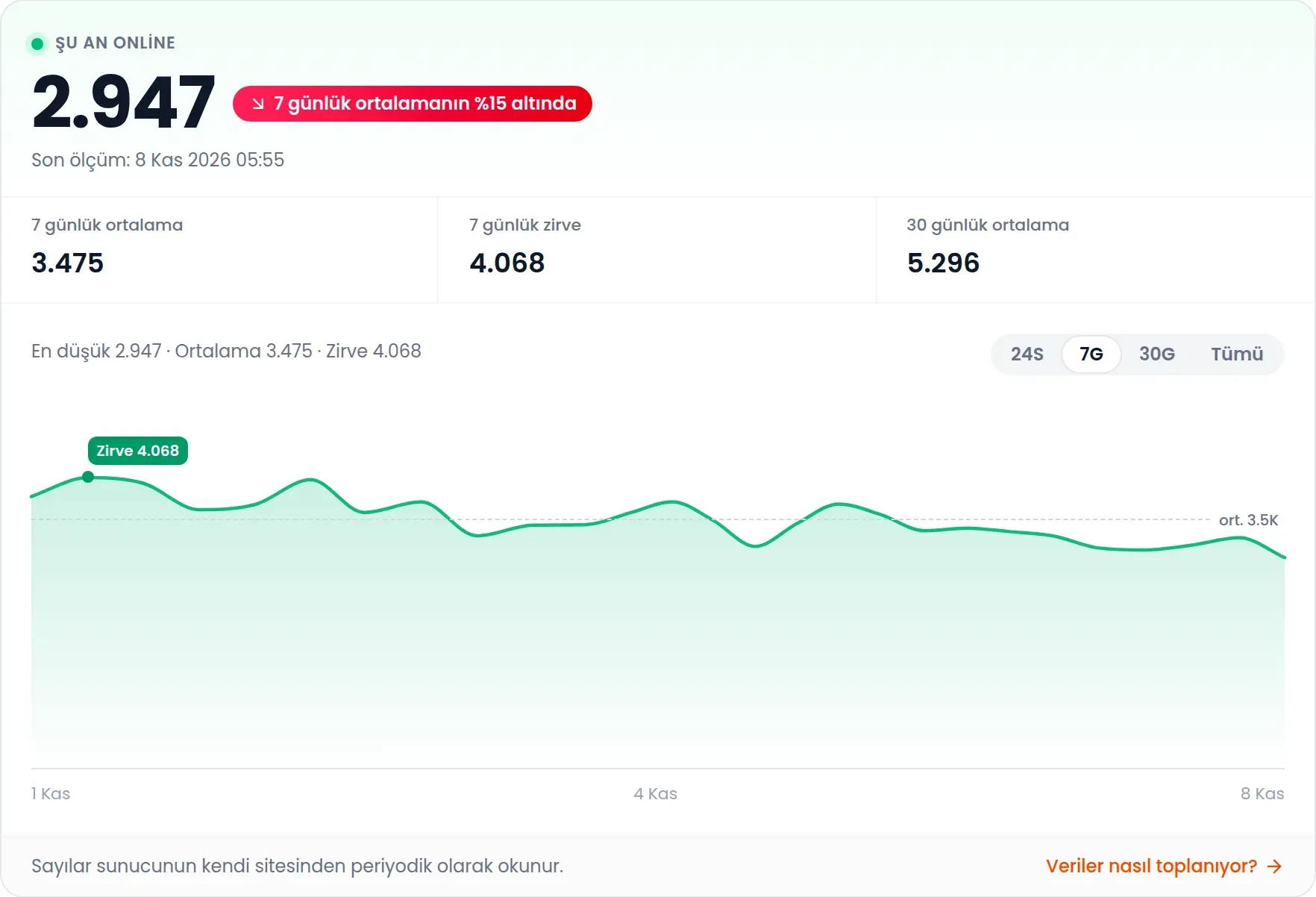
The number on Hitsro's Online History screen comes from the server's own website. SRO.GG does not independently count players inside the game. Treat it as a reported figure, rather than proof of quality or the number of distinct people playing.
Check Last reading. Where available, compare the seven-day average and chart instead of relying on a single snapshot. Use 24H, 7D, 30D and All to change the chart range. A missing counter does not mean a server has zero players; data may simply be unavailable.
6. Comments and your checklist

In Comments, read recent posts and then older experiences. You can switch between Newest First, Oldest First and Most Popular. When reading a claim, look at the post’s date, the details it gives and any replies.
Before choosing, work through this short checklist:
Do the cap and race suit the character I want to play?
Have I compared the IP, PC, guild and union limits with my group's needs?
Do I know when the main launch and any beta start?
Does the introduction clearly explain the systems I care about?
Have I checked the player count's source and reading time?
Have I read several comments and confirmed missing details through the server's own channels?
If you are still unsure, work through the same questions for another server. This helps you compare each server on the same terms.